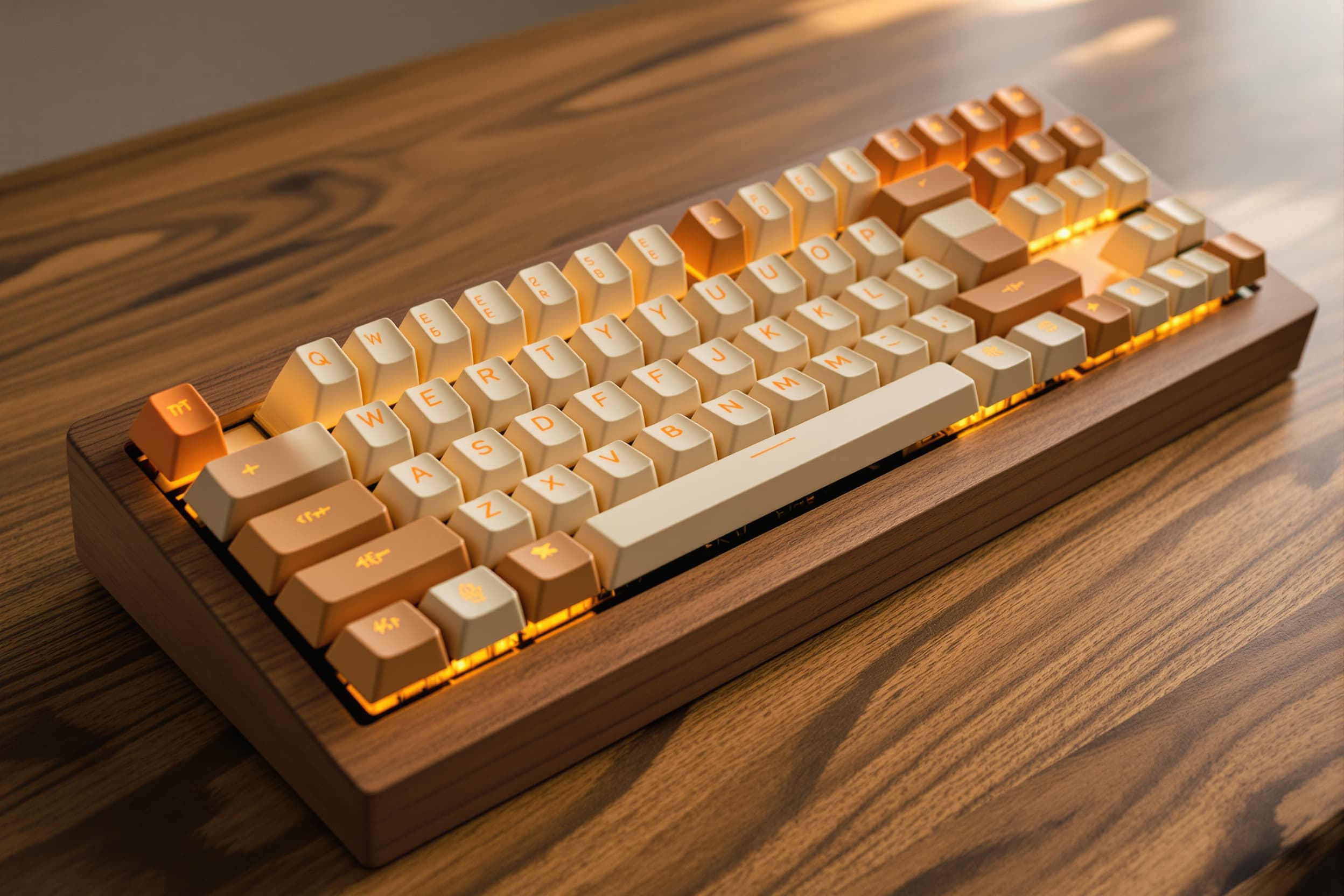
A DIY custom mechanical keyboard built from individual components including switches, controller, PCB or hand-wired matrix, enclosure, and keycaps. Typically designed for 60% to full-size layouts with Cherry MX or Alps-compatible switches. Build approach ranges from prototype-quality hand-wiring to fully designed PCBs with CNC-machined or layered enclosures.
Bottom line
Custom mechanical keyboards are fundamentally a systems-integration challenge rather than a high-volume commodity product. The value lies in design flexibility, firmware customization (QMK/VIA), and rapid prototyping of enclosures (CNC aluminum, laser-cut acrylic, 3D-printed cases). Portugal has a strong network of PCB houses, precision CNC shops, and electronics assemblers who can handle mixed SMT + through-hole builds with Teensy microcontrollers and hand-wired matrices. The main imported components—mechanical switches, keycaps, and MCU boards—are commodity items available from EU distributors (TME, Mouser EU, Digi-Key EU) with 1–2 week delivery. By keeping final integration, firmware flashing, enclosure fabrication, and QA in-house, you retain full IP control over the layout and firmware, reduce iteration cycles to days instead of weeks, and can offer bespoke one-off or small-batch builds that differentiate from mass-market keyboards. The localizationScore of 6 reflects this hybrid model: core electronics are commodity imports, but the value-added assembly, customization, and design are highly localizable.
What we suggest, based on the analysis.
Design and integrate the keyboard locally using Portuguese PCB fabricators, CNC/laser-cutting shops for enclosures, and electronics assemblers for soldering and final assembly. Source mechanical switches, keycaps, and Teensy controllers from EU distributors (TME, Mouser, Digi-Key). Firmware customization and QA performed in-house.
Suggested companies
Pros
Cautions
Other paths weighed against the recommendation
Purchase pre-assembled mechanical keyboard kits or finished keyboards from an EU-based contract manufacturer or keyboard specialist, then rebrand with custom keycaps, firmware, and packaging. Suppliers may offer semi-custom layouts (60%, TKL, full-size) with choice of switch type and case finish.
Collaborate with a specialized EU electronics design house or keyboard OEM to co-develop a custom PCB, enclosure, and firmware stack. Partner provides PCB layout, component sourcing, enclosure tooling (injection mold or CNC fixture), and assembly line setup. Suitable for medium volumes (200+ units) or productized designs requiring ongoing manufacturing.
Source fully assembled mechanical keyboards or complete DIY kits from Chinese OEMs specializing in custom keyboards (Shenzhen ecosystem). Vendors offer wide switch selection, aluminum CNC cases, hot-swap PCBs, and pre-flashed QMK firmware. Intended as cost/lead-time reference only; not recommended for localized IP control or rapid iteration.
Registers every key press and sends the correct letter or command to your computer over USB.
Allows customization of layout, key feel, and appearance to match personal typing preferences.
Provides a durable, repairable input device that can be upgraded or modified over time.
Use CAD or vector software to plan switch positions, mounting holes, and enclosure layers.
Laser-cut aluminum or acrylic layers, CNC-machine a case, or 3D-print enclosure parts.
Hand-wire rows and columns with diodes, or populate and solder a custom PCB.
Mount the Teensy 2 board, connect matrix wires, and upload keyboard firmware (QMK or TMK).
Stack and fasten case layers, secure the PCB, snap switches into the plate, and press on keycaps.
Mechanical switches (Cherry MX, Gateron, Kailh), keycaps (PBT double-shot), and Teensy 2.0 controller boards are predominantly manufactured in Asia (China, Taiwan, Germany for Cherry). Lead times for switches can stretch to 4–8 weeks during high demand (e.g., pandemic-era gaming peripheral boom), and stock-outs of popular switch types (tactile browns, linear reds) are common. Keycap sets, especially custom legends or exotic profiles (SA, MT3), often have 8–12 week lead times. Teensy boards are single-sourced from PJRC (USA) with occasional stock shortages. A delay in any of these components halts final assembly, and there are few EU-based alternatives for mechanical switches or Teensy-compatible controllers.
→ Mitigation: Maintain safety stock (2–4 weeks' worth) of the top 3 switch types and Teensy controllers. Establish accounts with multiple EU distributors (TME Poland, Mouser Europe, Digi-Key Europe) to spread risk. Pre-qualify alternative controllers (Pro Micro, Elite-C, nice!nano) that are pin-compatible and QMK-supported, so firmware can be ported if Teensy stock runs out. For keycaps, partner with EU-based keycap vendors (e.g., Signature Plastics EU resellers, GMK in Germany) and offer a core set of in-stock profiles while positioning custom sets as premium add-ons with longer lead times. Buffer production schedules by 2 weeks to absorb component delays.
Custom keyboard designs are highly replicable: PCB layouts, enclosure CAD files, and QMK firmware configurations are often shared in open-source communities (GitHub, GeekHack, r/MechanicalKeyboards). If production is outsourced to a low-trust partner or if design files are uploaded to an online PCB house without NDA, there is risk that the design will be cloned and sold by competitors—especially in China where enforcement of design rights is weak. Firmware source code, if not properly licensed, can be forked and rebranded. Even within the EU, small CNC shops or PCB houses may reuse your enclosure design for other clients unless contractual IP protections are in place.
→ Mitigation: Use NDAs and IP ownership clauses with all contract manufacturers, PCB houses, and CNC shops. For PCBs, work with trusted EU fabricators (e.g., CICOREL, Eurocircuits) that have strong IP policies. Keep firmware repositories private or use permissive open-source licenses (MIT, GPL) that require attribution and derivative disclosure. Watermark or serialize PCBs with unique revision codes and batch numbers to trace leaks. For high-value custom enclosures, retain CAD files in-house and only share manufacturing-ready STEP or DXF files with minimal design intent. Consider filing for EU design rights (Registered Community Design) if the enclosure or PCB layout has commercial novelty.
Mechanical keyboards are electrical equipment sold in the EU and must carry CE marking under the Low Voltage Directive (2014/35/EU), EMC Directive (2014/30/EU), and RoHS Directive (2011/65/EU). USB devices can emit electromagnetic interference (especially with long unshielded cables or poorly grounded enclosures), and poorly designed PCBs may fail radiated emissions tests (EN 55032, EN 55035). The Teensy 2.0 controller itself is not CE-certified as a finished product—only as a component—so the integrator (you) is responsible for system-level compliance. If keyboards are sold without CE marking or fail market surveillance testing, you face fines, product recalls, and marketplace (Amazon, eBay) suspensions.
→ Mitigation: Engage an EU-based EMC test lab (e.g., SGS, TÜV Rheinland, Applus+) early in the design phase to pre-test prototypes for radiated/conducted emissions and immunity. Design the PCB with proper ground planes, ferrite beads on USB power lines, and shielded USB cables. Use metal or conductive-coated enclosures (aluminum, powder-coated steel) to provide Faraday shielding and reduce EMI. Prepare a Technical Construction File (TCF) with schematics, BOM, test reports, risk analysis, and Declaration of Conformity. If producing <1,000 units/year, consider self-certification with consultancy support; for higher volumes, invest in full third-party testing (€2,000–5,000). Ensure all components (switches, keycaps, PCB) are RoHS-compliant and REACH SVHC-free by requesting declarations from suppliers.
Custom enclosures—whether CNC-machined aluminum, laser-cut acrylic layers, or 3D-printed cases—are often the longest-lead and highest-cost items in a mechanical keyboard build. CNC machining for a single aluminum case can take 3–7 days per unit, and anodizing or powder-coating adds another 5–10 days. Laser-cutting acrylic is faster (1–2 days) but requires design iteration to ensure proper switch plate tolerances and screw hole alignment. 3D printing (FDM or SLA) is quick for prototypes but may not deliver production-quality surface finish or strength. If the enclosure vendor is overbooked or encounters tooling issues (broken end mills, acrylic cracking), the entire production run can slip by 2–4 weeks, delaying delivery even if all electronics are ready.
→ Mitigation: Dual-source enclosure fabrication: maintain relationships with both a primary CNC/laser shop and a backup (either another local shop or an online service like Xometry, Hubs). Front-load enclosure design and order sample cases 2 weeks before PCB assembly begins, so any fit issues (switch plate tolerance, standoff height) can be corrected. For aluminum cases, specify standard finishes (clear anodize, bead-blast) that most shops stock, avoiding custom colors that require batch minimums. For acrylic, order 10% extra layers to buffer against cracking or misalignment. If lead time is critical, design a modular enclosure that can be assembled from off-the-shelf extrusions or sheet stock, reducing custom machining.
Mechanical keyboards require precise through-hole soldering (switches, diodes) and delicate SMT work (if using a custom PCB with controller, USB connector, and passives). Hand-soldering 61 switches and 61 diodes is error-prone: cold solder joints, bridged pads, reversed diode polarity, and loose switch pins are common in prototype or low-volume builds. If the assembler lacks experience with keyboard matrices or QMK firmware, they may not catch wiring errors until final testing—at which point rework is time-consuming and may damage the PCB. For hand-wired builds, wire routing and strain relief are critical; poor wire management can cause intermittent key failures or shorts.
→ Mitigation: Qualify your assembly partner with a pilot build of 5–10 units before committing to larger batches. Provide detailed assembly instructions, including diode orientation diagrams, switch insertion depth, and firmware flashing checklist. Use a PCB design with clear silkscreen labels for diode polarity and switch orientation. Implement 100% electrical testing: flash test firmware (QMK or VIA) and use a key tester script to verify every switch registers correctly. For hand-wired builds, specify wire gauge (24–26 AWG), stripping length, and solder joint inspection criteria (shiny, concave fillet). Train or hire assemblers with hobbyist keyboard-building experience (e.g., from local makerspaces or mechanical keyboard communities). Budget 10% rework time and spare components (switches, diodes, Teensy boards) to replace any defective parts.
8 weeks · 7 steps
Full description of every production step
Finalize the keyboard layout (61-key, ANSI or ISO), switch positions, and enclosure geometry using CAD software (KiCad for PCB, Fusion 360 or FreeCAD for mechanical). Generate Gerber files for PCB fabrication, DXF/STEP files for switch plate and enclosure layers. Define switch type (Cherry MX, Gateron), keycap profile (Cherry, OEM, SA), and controller pinout (Teensy 2.0). Lock BOM and firmware configuration (QMK layout JSON).
Submit Gerber files to EU PCB house (e.g., Eurocircuits, CICOREL) for 2-layer FR4 board with ENIG or HASL finish. Order mechanical switches (61× Cherry MX or Gateron), diodes (61× 1N4148 through-hole or SOD-123 SMD), Teensy 2.0 controller, USB cable, and passive components (resistors, capacitors if needed) from EU distributors (TME, Mouser). Receive PCBs in 7–10 days and components in 5–7 days.
Needs: Layout Design and CAD Freeze
CNC-machine aluminum top and bottom case halves, or laser-cut acrylic/FR4 layers for a layered sandwich-style enclosure. Laser-cut or waterjet-cut the switch plate (1.5 mm aluminum or stainless steel) with 14×14 mm square cutouts for Cherry MX switches. Apply surface finish (anodize, powder coat, or bead blast for aluminum; edge polishing for acrylic). Tap screw holes and install threaded inserts or standoffs.
Needs: Layout Design and CAD Freeze
Populate the PCB with diodes (solder in correct orientation, cathode toward column), through-hole sockets or direct-solder pads for switches, and header pins or direct-solder pads for Teensy 2.0. If using SMT components, perform reflow or hand-solder. Hand-wire the matrix if no PCB is used: solder rows and columns of wire to switch pins with diodes inline. Inspect all solder joints for cold joints, bridges, or loose connections.
Needs: PCB Fabrication and Component Procurement
Mount the Teensy 2.0 controller to the PCB (socket or direct solder). Connect matrix rows and columns to the appropriate Teensy GPIO pins per the firmware pinout. Flash QMK or TMK firmware via USB using QMK Toolbox or Teensy Loader. Test the matrix by shorting each switch position and verifying keycode output in a key tester (VIA, QMK Configurator test mode, or online key tester). Debug any non-responsive keys or ghosting.
Needs: PCB Assembly and Matrix Soldering
Insert mechanical switches into the switch plate and snap or solder them into the PCB. Stack enclosure layers (bottom case, PCB with standoffs, switch plate, top case) and secure with screws. Route and dress internal wiring if hand-wired. Install USB cable (detachable or fixed). Press keycaps onto switch stems, ensuring proper alignment and seating. Perform final functional test: verify all keys register, test modifier combinations, check for any mechanical wobble or loose screws.
Needs: Enclosure and Switch Plate Fabrication, Controller Installation and Firmware Flashing
Conduct full QA: key rollover test (6KRO or NKRO), typing feel assessment, firmware stability check, and visual inspection for cosmetic defects (scratches, misaligned keycaps). Clean enclosure and keycaps. Package each keyboard with USB cable, user manual (firmware flashing guide, layout map), and any spare parts (extra switches, keycap puller). Box and label for shipment. Release first batch (1–50 units).
Needs: Final Assembly and Keycap Installation
9 processes · 10 materials · 8 parts

FR4 PCB substrate

aluminum plate
acrylic
wood

stainless steel

polycarbonate

PLA or ABS plastic

copper wire
solder
electronic components
Registers each key press with a tactile or linear mechanism that closes an electrical circuit when pressed.
Holds all the switches in precise alignment and provides rigidity and a stable typing feel.
Connects switches in rows and columns so the controller can scan which keys are pressed.
Reads the switch matrix and translates key presses into USB keyboard signals for the computer.
Prevents ghosting by ensuring current flows in only one direction through each switch.
Houses and protects all internal components while providing weight and aesthetic finish.
Provides the labeled typing surface for each key and attaches to the switch stem.
Secures the layered or assembled enclosure and holds the PCB in place.
Regulations and certifications to clear